In part 1 we explained how every pull request gets its own copy of Diffie, and how our test suite checks that the important flows still work on it. But a suite only knows about things that already existed. When a pull request adds something new, no test covers it yet. Someone has to click through it by hand, and usually nobody does.
Diffie QA closes that gap. On every pull request it works out what changed, writes a test for it, runs the test, and posts the result.
How Diffie QA works
- 1
Claude reads what changed.
It looks at the code changes in the pull request and picks the one thing a reviewer would most want checked.
- 2
It writes a short test in plain English.
At most eight steps, like “Open the homepage” and “Check the heading says…”. It also finds the buttons and fields in the code, so the test knows what to look for.
- 3
Claude hands the test to Diffie through the Diffie skill.
The Diffie skill teaches Claude how to use Diffie. Through it, Diffie turns the steps into a real browser test and runs it against the pull request’s own copy of Diffie, so the result is about that pull request’s code.
- 4
The result comes back to the pull request.
A comment shows pass or fail, the steps it took, and a recording you can watch.
If a pull request changes nothing a person can see, such as a documentation or CI change, Diffie QA checks the basics instead: can you sign in, and does the dashboard load?
Example 1: changing the website title
We changed the text that appears in the browser tab for our website. This is the test Diffie QA wrote for that pull request.
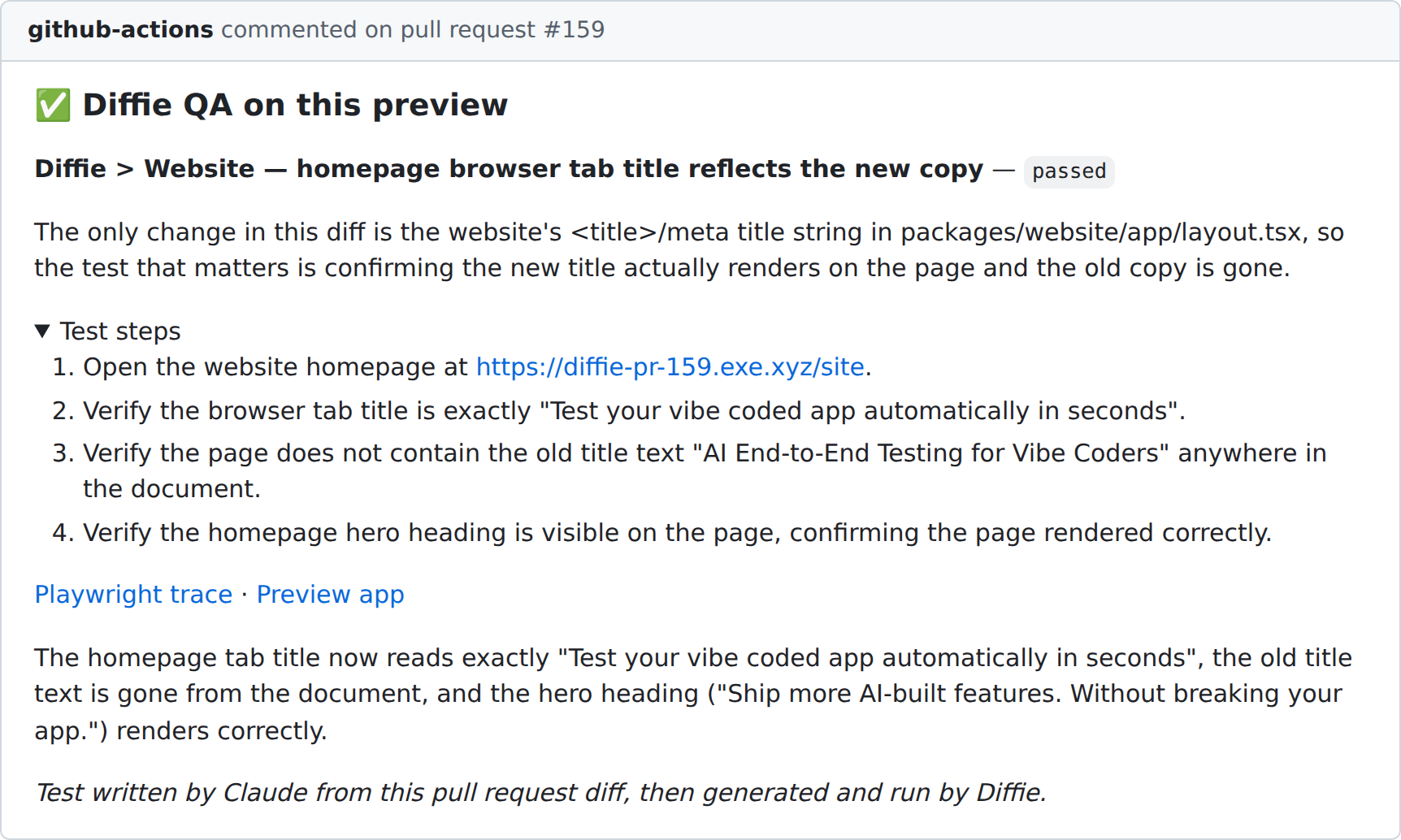
Look at step 3. Nobody asked for it. Diffie QA did not only check that the new title shows up. It also checked that the old title is gone, which is how you catch a change that only half landed. Then it checked the page still renders, so a blank page could not pass by accident.
Example 2: changing the homepage heading
Next we changed the big heading at the top of the homepage.
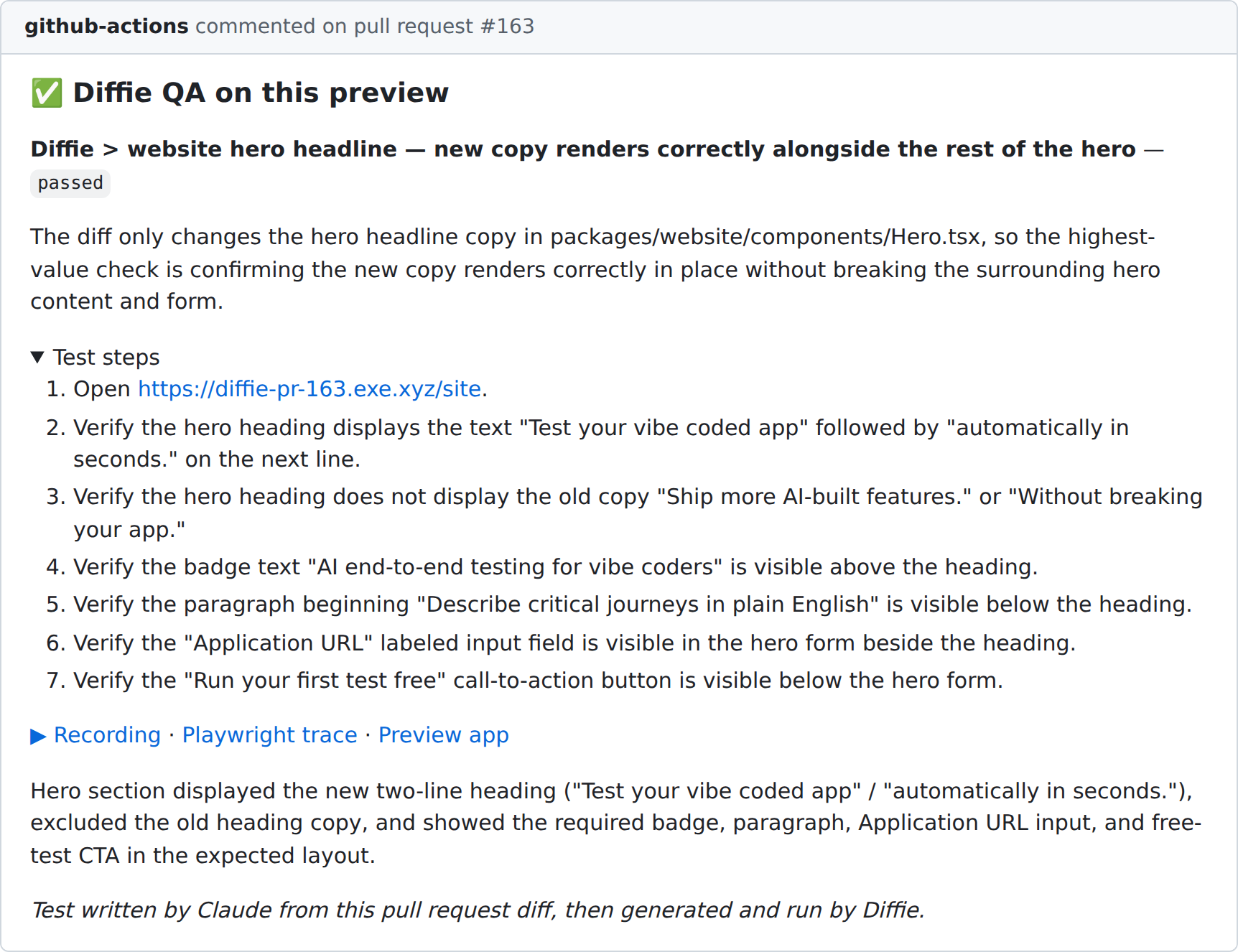
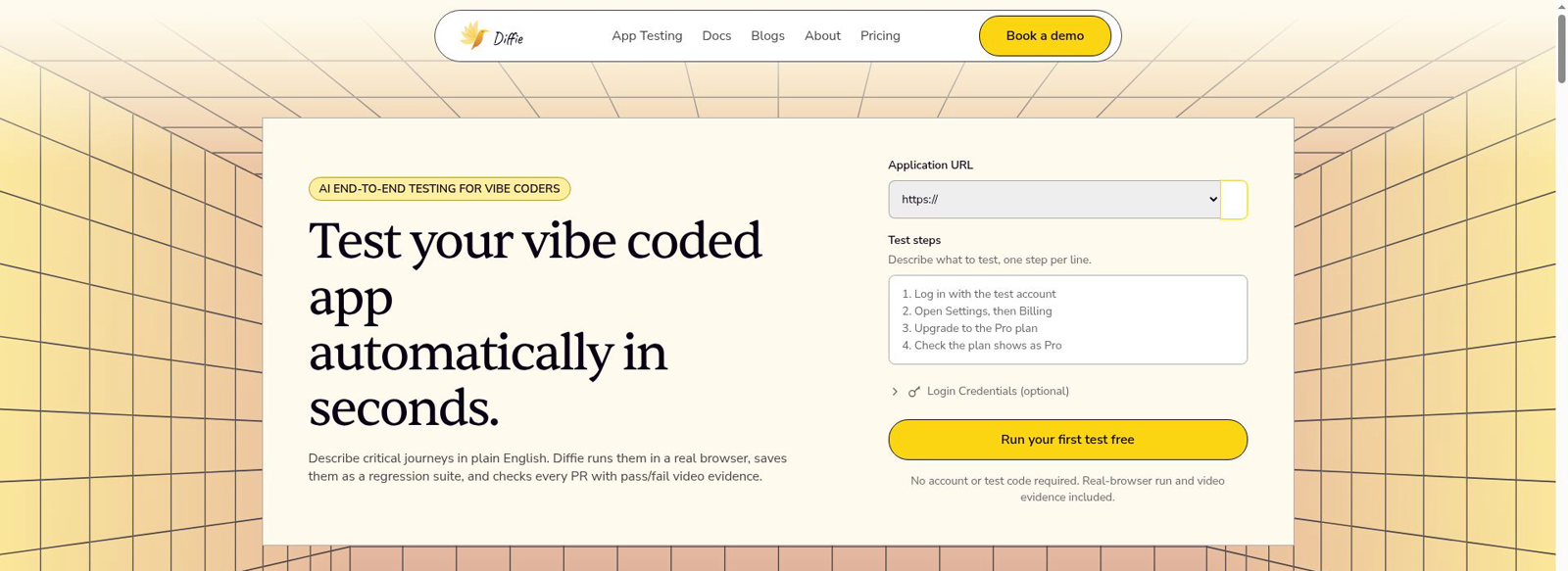
Diffie ran it in a real browser. Here is a frame from the recording, showing the new heading on that pull request's copy of the website:
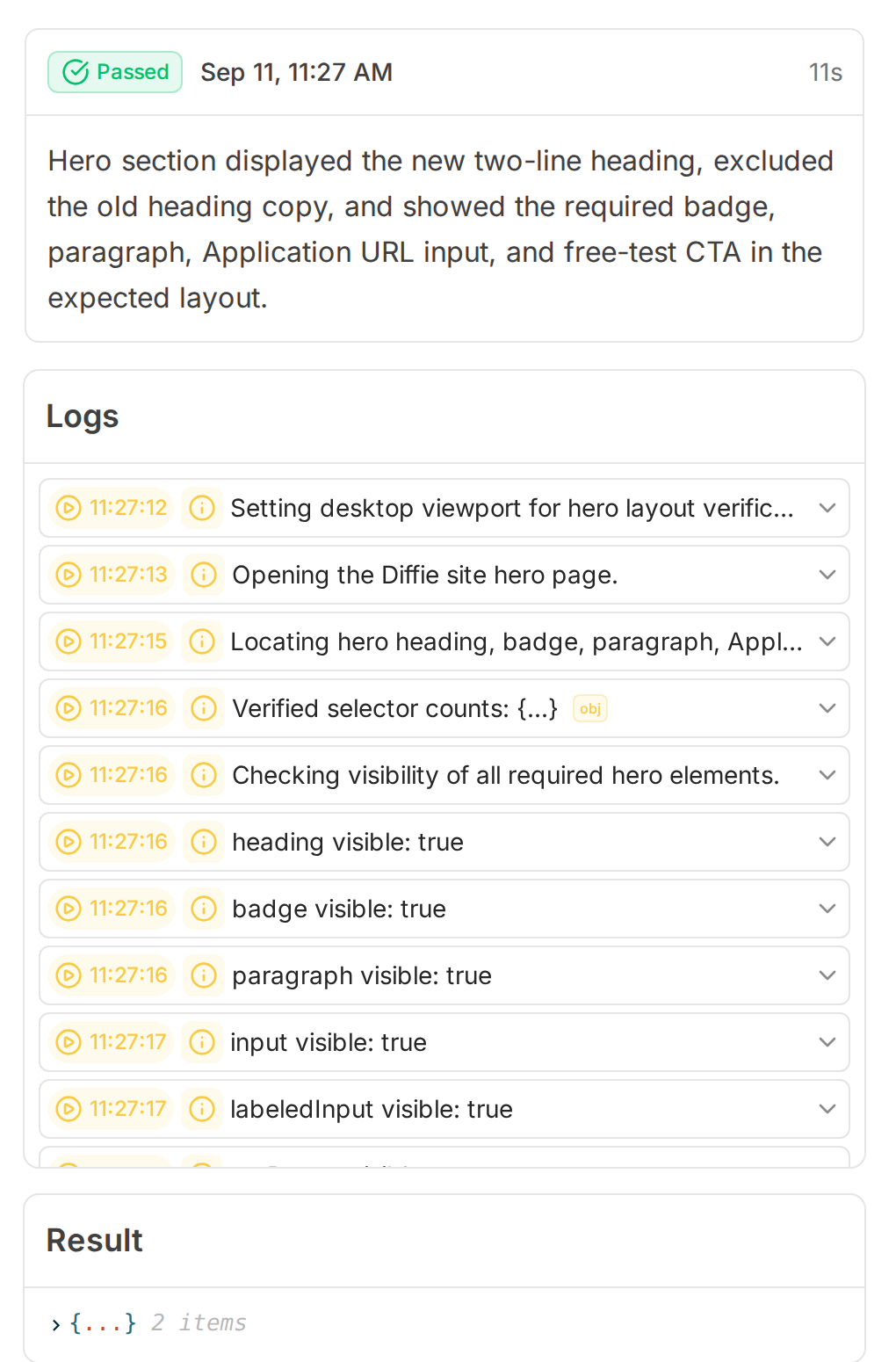
Every run also gets its own page in Diffie, with the result and each check it made along the way:
Example 3: a change with nothing to see
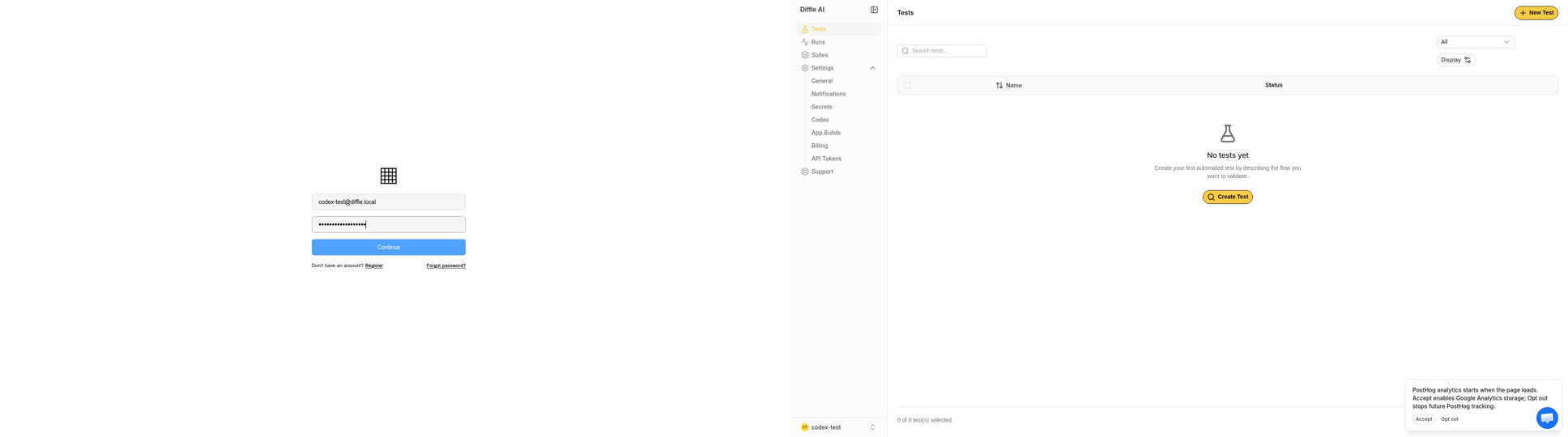
Pull request #167 only changed our CI scripts. There was nothing visible to test, so Diffie QA fell back to the basics: sign in, then check that the dashboard loads.
The workflow behind it
Diffie QA is one job in our GitHub Actions workflow. It runs once the pull request's copy of Diffie is up. Here it is, shortened a little for reading:
qa:
  name: Diffie QA
  needs: publish                # wait for the pull request's copy of Diffie
  runs-on: ubuntu-latest
  timeout-minutes: 45
  steps:
    - uses: actions/checkout@v4
      with:
        fetch-depth: 0          # Claude needs both sides of the diff

    - name: Install Claude Code
      run: npm install -g @anthropic-ai/claude-code

    - name: Plan a test from the diff
      id: plan
      env:
        CLAUDE_CODE_OAUTH_TOKEN: ${{ secrets.CLAUDE_CODE_OAUTH_TOKEN }}
        BASE_SHA: ${{ github.event.pull_request.base.sha }}
        HEAD_SHA: ${{ github.event.pull_request.head.sha }}
        APP_URL: ${{ needs.publish.outputs.app-url }}
        WEBSITE_URL: ${{ needs.publish.outputs.website-url }}
        PLAN_FILE: ${{ runner.temp }}/qa-plan.json
      run: .github/scripts/pr-qa-plan.sh

    - name: Create and run the test on Diffie
      env:
        CLAUDE_CODE_OAUTH_TOKEN: ${{ secrets.CLAUDE_CODE_OAUTH_TOKEN }}
        DIFFIE_API_TOKEN: ${{ secrets.DIFFIE_API_TOKEN }}
        TARGET_URL: ${{ steps.plan.outputs.target-url }}
        PLAN_FILE: ${{ runner.temp }}/qa-plan.json
        RESULT_FILE: ${{ runner.temp }}/qa-result.json
      run: .github/scripts/pr-preview-qa.sh

    - name: Comment the QA result
      if: always()
      env:
        GH_TOKEN: ${{ secrets.GITHUB_TOKEN }}
        RESULT_FILE: ${{ runner.temp }}/qa-result.json
      run: .github/scripts/pr-qa-comment.sh
It needs two repository secrets: CLAUDE_CODE_OAUTH_TOKEN (or an ANTHROPIC_API_KEY) so Claude can run, and DIFFIE_API_TOKEN so the Diffie skill can create and run tests. The three steps do the real work.
Step 1: Claude plans the test
The first script gives Claude a prompt and lets it read the code. It writes a plan and never touches Diffie. The heart of the script:
claude -p "$prompt" \
  --dangerously-skip-permissions \
  --max-turns 30
And the key lines of the prompt it sends:
Read the diff for this pull request:

    git diff ${BASE_SHA}...${HEAD_SHA}

1. Design exactly ONE end-to-end test: at most 8 steps, each one action
   or one verification.
2. Find selector hints in the checkout for the elements the test touches.

Write your plan as JSON to ${PLAN_FILE}.
--dangerously-skip-permissions lets Claude run commands without stopping to ask. That is fine on a throwaway CI machine, but do not use it on your own laptop.
Step 2: Claude runs it with the Diffie skill
The second script saves the Diffie token where the skill expects it, then starts a second Claude run that follows the plan:
mkdir -p ~/.diffie
jq -n --arg token "$DIFFIE_API_TOKEN" \
  '{apiToken: $token, apiUrl: "https://api.diffie.ai"}' > ~/.diffie/credentials.json

claude -p "$prompt" \
  --dangerously-skip-permissions \
  --max-turns 60
Use the diffie-qa skill to run the plan:
1. Create the test with POST /ci/tests, spec_url set to ${TARGET_URL}.
2. Poll GET /ci/tests/{id} until processingStatus is processed or error.
3. Execute with POST /ci/tests/{id}/execute, then poll until the run
reaches a terminal status.
Write the outcome as JSON to ${RESULT_FILE}.Why two Claude runs instead of one? The first only reads code, and the second only follows the plan and talks to Diffie. Two short prompts are much easier to fix than one long one.
Step 3: Post the result
The last script is plain code, no AI. It turns the result into the comment you saw in the examples, builds the links to the recording and the trace, and waits for the recording if it is not ready yet.
The Diffie skill: use the same thing yourself
You do not have to build all of that yourself. There is no special integration behind Diffie QA: it is Claude Code with the Diffie skill, a small add-on that teaches Claude how to use Diffie: create a test, run it in a real browser, read the result and fetch the recording. You can install it in Claude Code with two commands:
/plugin marketplace add Codebrahma/diffie-skill
/plugin install diffie@diffie
Then there are two ways to use it:
- Ask for tests. Tell Claude something like “Create E2E tests for my app at https://myapp.com”. It asks about your key flows, looks through your code for the buttons and fields to use, shows you a test plan, and creates the tests in Diffie once you approve it.
- Test a pull request. Ask Claude to set up Diffie PR testing for your repo, and it adds a workflow file for you. Then comment
/diffie teston a pull request. It reads the change, writes a test for it, runs it against your preview, and posts the result with a recording. Ours runs by itself on every push; the skill does the same job whenever you ask.
The suite and Diffie QA do different jobs
| Test suite | Diffie QA | |
|---|---|---|
| Who writes the test | We do, once | Diffie QA, fresh for every pull request |
| What it checks | The same important flows, every time | The new change in this pull request |
| When it fails | The pull request cannot merge | The reviewer sees what broke |
You want both. The suite protects what already works. Diffie QA looks at what is new.
What we learned building it
- Let the AI decide what to test, and let plain code do the rest. Claude was very good at choosing what mattered, like checking that an old title was gone. It was less reliable at small mechanical jobs, like building a link the same way every time. So those parts are plain code now, and the AI only makes the decisions.
- Wait for the recording. A test's video is saved shortly after the test finishes. Our first version looked too early and reported that there was no video. Now it waits for it.
- One test per pull request is enough to start. It keeps each run quick and the comment easy to read.
- It costs a little on every push. One AI run and one Diffie test run. For us, catching a broken change before it merges is worth that.
Putting it together
That is how we test Diffie with Diffie: a fresh copy for every pull request, a small suite that protects what already works, and Diffie QA to check what is new. Every pull request arrives with proof that it works, and a recording to show it.
Written by Kameshwaran Sachithanantham.
Published September 15, 2026
Related reading
Test the thing you just built
Describe a flow in plain English and Diffie runs it in a real browser, with a recording of every step.
Using Claude Code? Install the Diffie skill.