In May we wrote about the tests that guard every change to Diffie. They ran against one shared server. That worked, but it had a blind spot: the tests checked whatever was deployed to that server, not the code inside the pull request.
So we changed it. Now every pull request gets its own complete copy of Diffie, and our tests run against that copy. This is part 1 of two. It covers the copy and the test suite that runs on it. Part 2 covers Diffie QA, which reads each pull request and tests the new thing it adds.
What happens when we open a pull request
- 1
A new copy of Diffie starts, just for this pull request.
The website, the app, the API, the database, and the part that runs tests. Everything a customer uses, built from the code in the pull request.
- 2
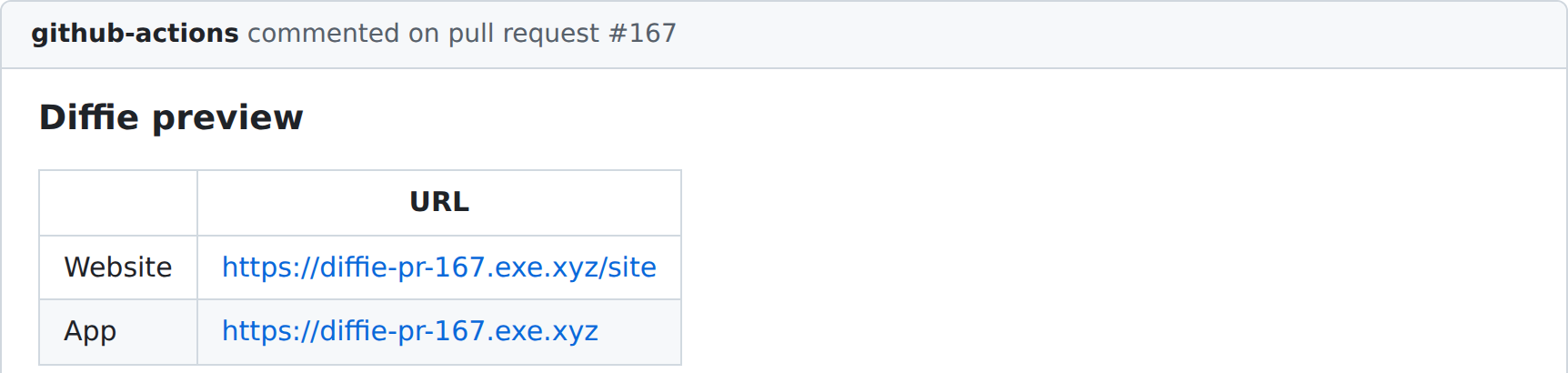
A comment appears with two links.
One opens the website and one opens the app. Anyone reviewing can click and try the change instead of guessing from the code.
- 3
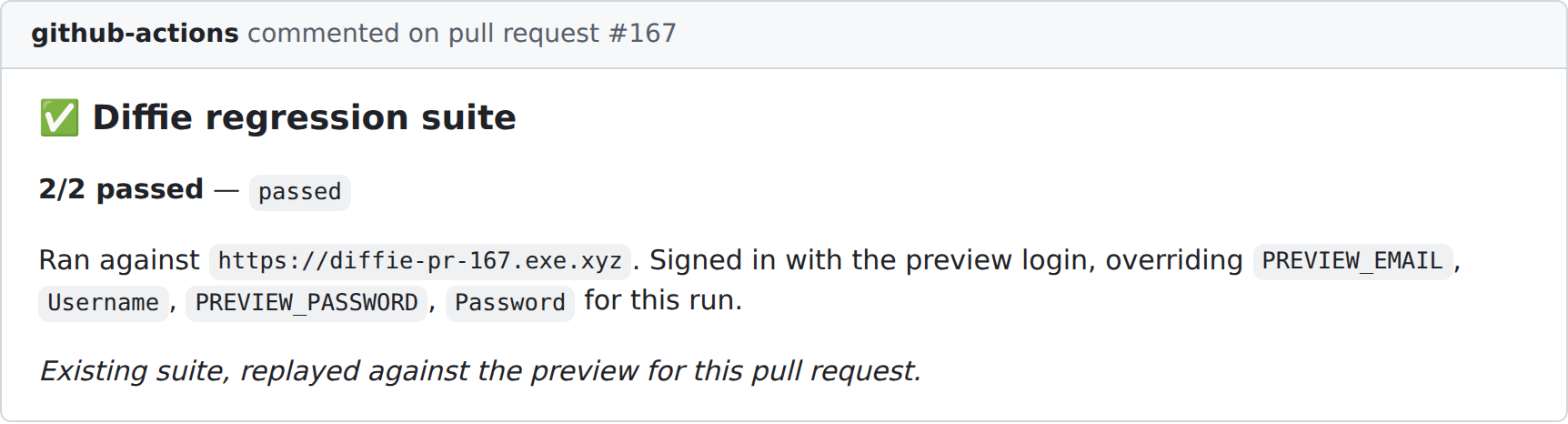
Our test suite runs against the copy.
Diffie opens the copy in a real browser and walks through each test. If a test fails, the pull request gets a red check.
- 4
When the pull request closes, the copy is deleted.
Nothing is left running, and nothing is shared with the next pull request.
Why a copy for every pull request?
- It tests the right code. A shared server runs whatever was deployed last. A copy runs exactly the code in the pull request, so when a test fails, you know it was that pull request.
- Pull requests stop getting in each other's way. Nobody can break a shared server for everyone else.
- Reviewers can try the change. Clicking a link beats reading a diff and imagining what it does.
It is not free. Each copy is a small virtual machine. The first start takes about two minutes, and a new push to the same pull request takes well under a minute. We think that is a fair price for knowing the change actually works.
The test suite: a short list of things that must always work
A regression suite is a small set of tests for the things that must never break. If one of them fails, the pull request does not merge. Ours runs as a check on every pull request, against that pull request's own copy.
We keep it small on purpose. Every test in the suite runs on every push, and a slow suite is a suite people learn to skip. A test earns a place only when its flow is important enough to block a merge.
Set it up on your own repo
You do not need a copy of your whole app to do this. Any pull request preview works, such as a Vercel or Netlify preview deployment. Here is the whole setup.
Step 1: Write the tests that must never break
In Diffie, create a test for each flow you would never want to ship broken, such as signing in or checking out. Describe each one in plain English, and Diffie turns it into a browser test. Start with two or three.
Step 2: Put them in a suite
Open Suites and click Create Suite. Give it a name, then click Add Tests and pick the tests from step 1. On the suite's page, copy the Suite ID. That ID is how GitHub will find the suite.
Step 3: Create an API token
In Diffie, go to Settings → API Tokens and click Create Token. Copy the token straight away. It lets GitHub start the suite for you.
Step 4: Give GitHub the token and the suite ID
In your GitHub repository, open Settings → Secrets and variables → Actions and add two things:
- A secret named
DIFFIE_API_TOKEN, with the token from step 3. Secrets stay hidden, even in logs. - A variable named
DIFFIE_SUITE_ID, with the ID from step 2. A suite ID is not secret.
Step 5: Add the workflow file
Create .github/workflows/diffie-suite.yml in your repository with this:
name: Diffie suite

on:
  pull_request:
    types: [opened, synchronize, reopened]

jobs:
  diffie-suite:
    name: Diffie suite
    runs-on: ubuntu-latest
    timeout-minutes: 30
    steps:
      # Replace this step with whatever gives you the pull request's
      # preview URL, for example waiting for a Vercel or Netlify preview.
      - name: Get the preview URL
        id: preview
        run: echo "url=https://pr-${{ github.event.pull_request.number }}.preview.example.com" >> "$GITHUB_OUTPUT"

      - name: Run the Diffie suite on the preview
        env:
          DIFFIE_API_TOKEN: ${{ secrets.DIFFIE_API_TOKEN }}
          DIFFIE_SUITE_ID: ${{ vars.DIFFIE_SUITE_ID }}
          PREVIEW_URL: ${{ steps.preview.outputs.url }}
        run: |
          # Start the suite against this pull request's preview.
          RUN_ID=$(curl -sS -X POST "https://api.diffie.ai/ci/suites/$DIFFIE_SUITE_ID/execute" \
            -H "Authorization: Bearer $DIFFIE_API_TOKEN" \
            -H "Content-Type: application/json" \
            -d "$(jq -n --arg url "$PREVIEW_URL" '{baseUrl: $url}')" \
            | jq -r '.suiteRunId // empty')
          if [ -z "$RUN_ID" ]; then
            echo "Could not start the suite"
            exit 1
          fi
          echo "Started suite run $RUN_ID"

          # Check every 10 seconds until it finishes.
          while true; do
            RUN=$(curl -sS "https://api.diffie.ai/ci/suite-runs/$RUN_ID" \
              -H "Authorization: Bearer $DIFFIE_API_TOKEN")
            STATUS=$(echo "$RUN" | jq -r '.status')
            echo "$STATUS: $(echo "$RUN" | jq -r '.passed_tests') of $(echo "$RUN" | jq -r '.total_tests') passed"
            case "$STATUS" in
              passed) exit 0 ;;
              failed|cancelled) exit 1 ;;
            esac
            sleep 10
          done
Here is what each part does, in plain English:
on: pull_requestruns the file when a pull request opens, and again on every new push to it.- Get the preview URL is the one step you must change. It has to end with the address of this pull request's preview, because that is what gets tested.
- Start the suite asks Diffie to run your suite against that address.
baseUrltells Diffie to use the preview instead of the address your tests were written against. - Check every 10 seconds waits for the result. It ends with a success when every test passed and with a failure when any did not, and that is what turns the check on your pull request green or red.
Step 6: Make it block the merge
A red check only protects you if a pull request cannot merge past it. In your repository, open Settings → Rules → Rulesets (or Branches on older repositories), add a rule for your main branch, turn on Require status checks to pass, and add Diffie suite. Let it run on a few pull requests before you do this, so you know the suite is reliable.
Ours is the same job with two extra steps around it: before it, a fresh copy of Diffie starts for the pull request; after it, the result is posted as a comment with a recording of each test. The full guide, including Vercel and Netlify preview examples, is in Run a test suite in CI.
What the suite cannot do
The suite checks that important things still work. It cannot check the new thing a pull request adds, because nobody has written a test for it yet. That is the job of Diffie QA, which reads every pull request and writes that test for us. Read part 2.
Written by Kameshwaran Sachithanantham.
Published September 15, 2026